Imagine this scenario: You’ve heard a lot of good things about a platform called WordPress, that powers nearly half the websites on the internet, and you want to check it out and try it for yourself. You’re not a web developer or techie, though, so you do a Google search and discover there are two almost identical websites claiming to be WordPress: WordPress.org and WordPress.com. Neither one clearly explains what the difference between them is or why you should choose one over the other. What do you do?
Newbie’s dilemma
This isn’t just a hypothetical problem. It is a real dilemma faced by newbies daily. Without any real guidance about the difference between the two choices they’re presented with, their experience will have them choose WordPress.com as the de facto official WordPress website. More likely, though, is the situation that they aren’t even aware a choice needs to be made. They simply go to the first WordPress site they’re presented with, which will also be WordPress.com, assuming they’re then using the WordPress platform they heard so many positive things about. They’re wrong, and probably won’t know that anything is amiss for months if not years.
This is the place newbies stumble and lose their way more than at any other point in their WordPress experience. This is a crucial early decision point in which most people aren’t even aware a decision must be made. Education is all a website like this one can do, however, about the differences between the websites and what each represents.
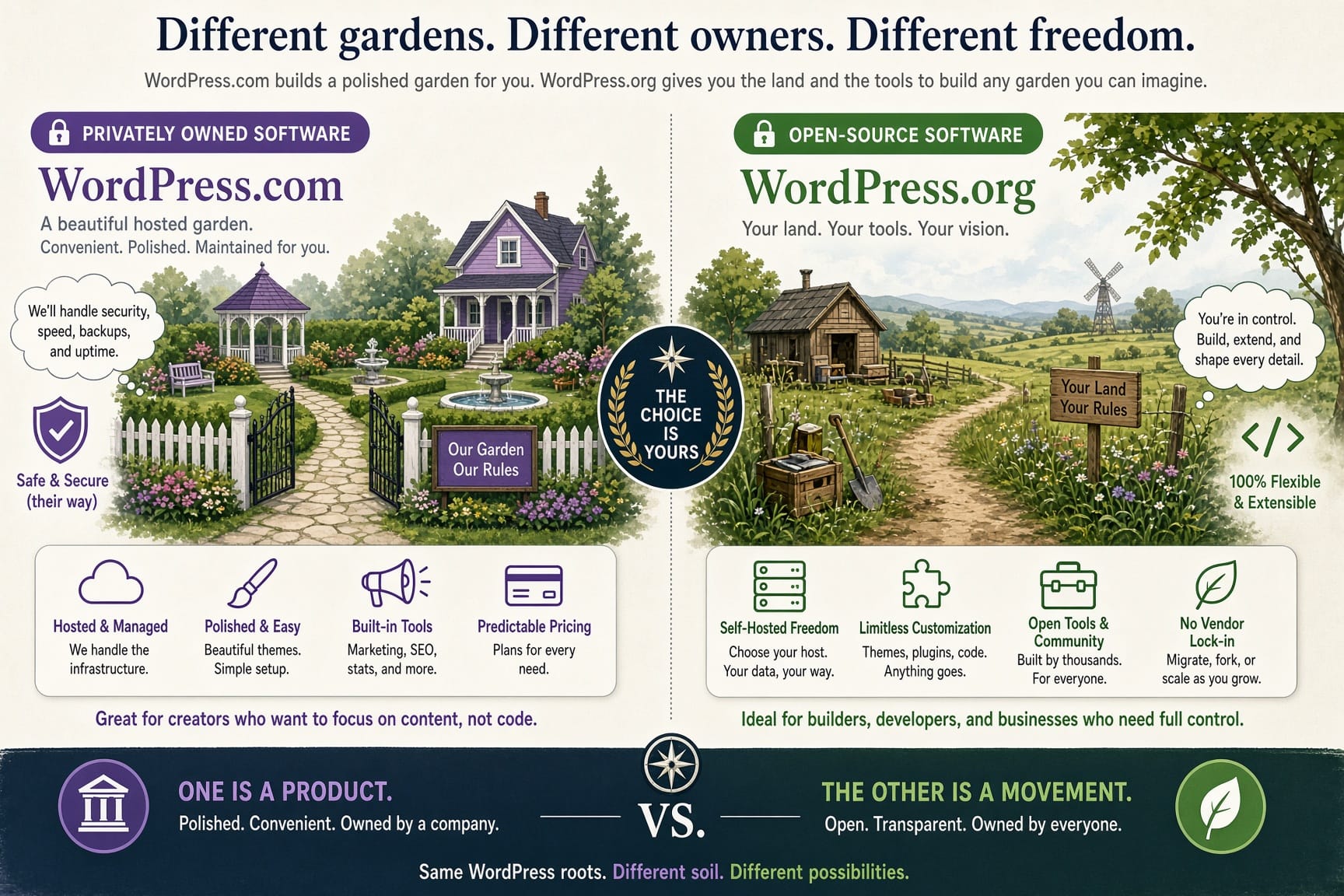
This is the site where you can download the open-source WordPress software, self-hosted WordPress. It’s where you can also get plugins and themes, and where you can get support in the user forums. For most users, however, this website isn’t a destination they’ll ever need to go to. The web host they choose, on whose servers their website will operate, will very likely offer WordPress installation directly from its control panel. Similarly, all future updates to the platform, as well as to the plugins and themes installed, will take place via the WordPress dashboard, pushed to their machines by WordPress.org, but requiring no special trips to that site. WordPress org is the home of the WordPress platform that runs over 40% of the planet’s web sites, but it’s not a website that requires bookmarking. It’s a web site most users never really interact with at all.
WordPress.com, on the other hand, is a destination website and a portal to a blogging tool that is a pared-down version of WordPress, owned and operated for a profit by Automattic, the company founded by WordPress co-creator Matt Mullenweg. Through the WordPress.com portal users can reach millions of websites running on this network, but they aren’t running websites on the WordPress platform so much as blogs that utilize the WordPress user interface, with the most powerful features removed and sold back to them for increasingly costly monthly subscription fees. It’s helpful to think of WordPress.com as a kind of WordPress Lite, sold as a “turnkey WordPress experience” in which the technical aspects of owning a website — security, optimization, backups and maintenance — are handled by Automattic so that users can concentrate on creating content. WordPress.com is essentially a blogging tool that users can use to create a website as long as they are okay paying a hefty price tag to do so, compared to the cost of a self-hosted WordPress website.
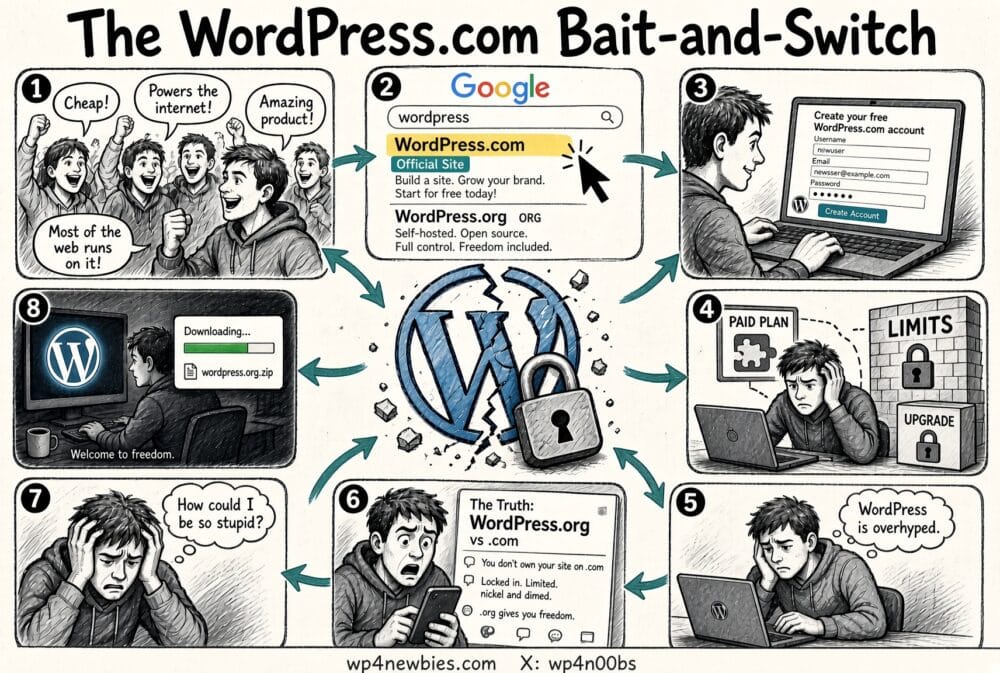
The following comic strip illustrates the way many WordPress newbies experience the two WordPress websites: initial exposure and curiosity about WordPress, followed by a search online and a sense of being steered towards WordPress.com, a period using that platform and growing disenchantment with it, an unveiling of the truth and embarrassment that they fell for a “bait and switch” scheme, followed by finally quietly moving to the real WordPress platform, their embarrassment still acutely felt, along with feat they’ll be considered unsophisticated and stupid for falling for the scheme in the first place.
Automattic’s underhanded marketing tactics notwithstanding, there are some real pros and cons to both platforms, and some users will do better on WordPress.com than on a website platform they must run by themselves. In order to determine which suits you better, it is helpful to see all their differences in a matrix or table.
The differences that will matter to you
| Self-hosted WordPress | WordPress.com | |
|---|---|---|
| Metaphors | Owning a house; an open wild expansive public green. | Renting an apartment; a managed, curated private garden. |
| Who runs the server | The web host of your choosing | Automattic |
| Plugins | 60,000 free plugins to download and use | Paid plans only; subset of plugins only |
| Themes | Any theme anywhere, many for free | Their library, with more options the more you pay |
| Website address | Your own domain from day one | You’re assigned a subdomain: yoursite.wordpress.com |
| Ads | None, unless you want to add them to make money yourself | Automattic places ads on your site and takes any profits |
| Web store | Yes, from day one, install WooCommerce plugin and go | Only on highest tiers of service |
| Updates & security | They are your responsibility | That’s all handled for you |
| What if I want to leave | Take your entire website with you | Export your content, that’s all you own |
| Best for | Small business owners, someone who loves the idea of running a web site | Bloggers, writers; someone who hates the idea of running a web site |
| Monetary cost | hosting + domain ($) | Monthly fees ($$) |
| Time commitment | Moderate | Minimal |
Which version of WordPress speaks to you?
Self-hosted WordPress is better suited to small business owners, entrepreneurs, tinkerers, and anyone who imagines having more than one website. WordPress.com is better suited to people who just want to write or blog, or who have a major time crunch and need content online by the end of the day.
Another way to get at that answer is to ask yourself the following, simple question: how does the prospect of running your own web site — optimizing it, making it secure, tweaking it to make your content score higher in search results, etc. — make you feel? If it excites and stimulates you, you’re the kind of person who will enjoy self-hosted WordPress. If just thinking about that scares you or stresses you out, go for WordPress.com.
Can you switch later?
Yes, you can leave either service in favor of the other. With WordPress.com, when and if you decide to leave, you can only take your content with you but not your website design. With WordPress.org, you own everything, and can take everything with you, to a new platform, or a new web host, or even to Automattic’s service if you wish. The most important consideration may be how much money you have handed to Automattic for features that were free in self-hosted WordPress, in which case getting out sooner than later is the smart choice.