
In your path to getting online, you need to nail down two things before anything else. You will need to choose your site’s web host and domain name. You can’t start using WordPress at all until these decisions are settled. Luckily, many web hosts include a free domain name with every new subscription, including those we specifically endorse below. In that case you don’t need a domain name pre-purchased so much as researched and selected.
In this article you will learn how to research and select a domain name that will boost your online credibility, and how to evaluate a web host on all the qualifications that are important. We’re hitting the ground running.
Buying a domain name
What is a domain name, anyway? Quite simply, it’s another term for your website address. A domain name is the word or group or words you type into the address field of your web browser after https:// or http:// like google.com or wordpress.org. Those words tells your browser what web site you want to visit.
The network of computers on the internet communicate with and know each other by IP addresses (IP stands for internet protocol). The original system of IP addresses, known as IPv4, is a system of 32-bit IP addresses: four numbers between 0 and 255 separated by dots, randing from 0.0.0.0 through 255.255.255.255. This encompasses 4.3 billion unique addresses. Today, however, we have something called the Internet of Things, meaning that not only are your computer, cell phone, and Amazon Echo online, but more and more often so are other devices that no one ever thought would be: your car, refrigerator, doorbell camera, television, climate control system, wall sockets and lightbulbs. The need for more IP addresses drove the creation of a new system of IP addresses called IPv6, which is a system of 128-bit addresses that adds an additional 340 undecillion IP addresses. That’s enough for every grain of sand on earth to be assigned several addresses. The new IPv6 system should never run out.
A system of numbers is a great way for machines to communicate, but not so much human beings. There is a limit on how many numbers we are able to commit to short-term memory (in case you were wondering, it’s around seven). So, when humans took to the web, the addition of domain names became necessary, and the DNS system was invented. DNS stands for domain name system. It is basically a big “phone book” matching human-oriented domain names with computer-oriented IP addresses.
You type a domain name into your browser address bar, say wp4newbies.com, and your computer quickly looks up the IP address for that domain name via the DNS registry, contacts that IP address, and it responds by sending the front page of the WordPress for Newbies website. All of this happens very quickly, close to the speed of light.
Anatomy of a domain name
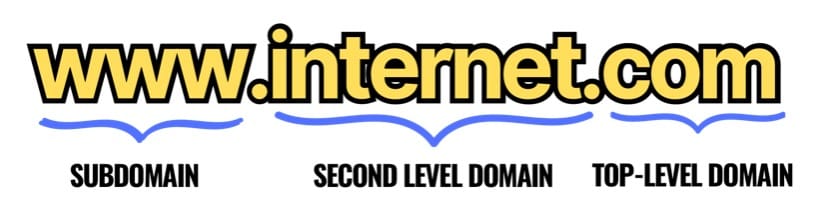
A domain name is made up of a word or group of words, called the second-level domain, followed by a domain suffix or extension like .com or .org, called the top-level domain (TLD). And finally, it is sometimes but not always preceded with a subdomain.
In the early internet days it was common for all websites to have a subdomain of www to delineate them from other internet protocols in use at a domain, like ftp (for file transfers) or smtp (for email). Today, however, a request received from a web browser is assumed to be a request for a web page, meaning www is rarely if ever used today. You should omit it when entering a domain name, even though in many cases the www subdomain will resolve to the same IP address as the domain name entered without it.
Domain name registrars
The organization that manages domain names is called the Internet Corporation for Assigned Names and Numbers (ICANN). They allocate IP addresses and manage the database of domain names. To search for a chosen domain name, you can use the ICANN’s lookup page or any of the over 2,000 registrars the ICANN contracts with. Using a registrar is usually the way to go, since you will not only find out whether a domain name is available, but how much it costs.
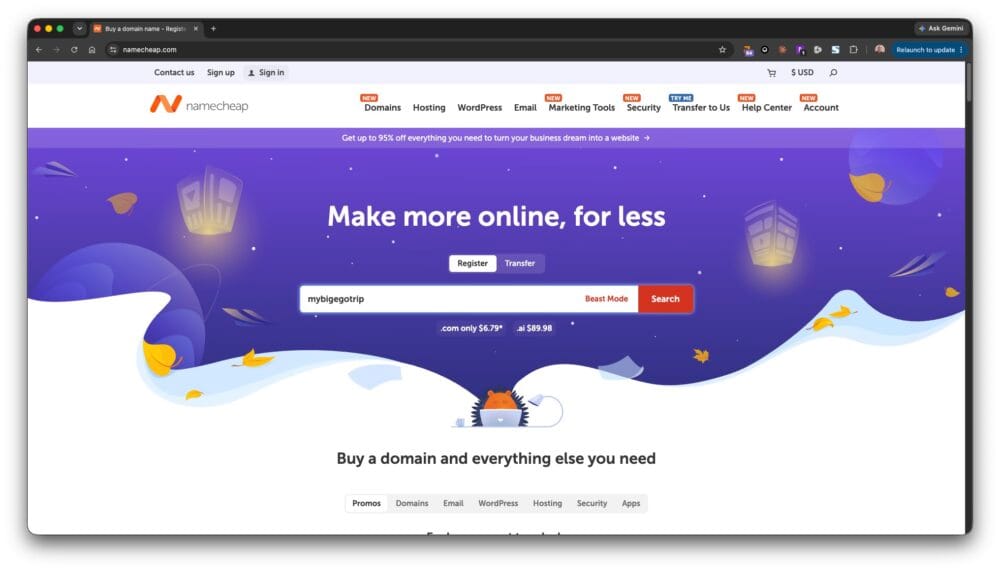
For your domain name research, we recommend GoDaddy and NameCheap because both sites make searching easy and both recommend alternatives when a domain name is unavailable. GoDaddy is the largest and most popular registrar, but NameCheap is also very popular and usually has a better price, befitting the company’s name.
Searching the domain name database is as easy as going to one of the registrars we recommend and typing a word you want into the search bar.
Evaluating domain names
For business websites, some people choose a domain name that is the actual name of their company; for example, AcmePlumbing.com. Others prefer a domain name that is a slogan or call to action. For a plumber, unclogyourpipes.com might be a good choice (these examples are both registered, by the way). Either approach is fine.
Your choice of top-level domain will influence the words available for your second-level domain. Some people claim business websites should always have a .com TLD to take advantage of the SEO advantages that domain extension bestows. But the .com TLD is extremely crowded. There are over 1,500 top-level domains, yet half of all domains registered end in .com. Practically speaking that means it will be very difficult to find an unclaimed short-phrase .com domain name, and virtually impossible to find one that is a single word. A shorter domain name, of course, is almost always preferable to a longer one.
Fortunately, there means there are 1499 top-level domains other than .com. If you’re really insistent on a .com domain name, consider .co and .net which are popular and legitimate alternatives. Even .org would be acceptable as a substitute, although technically it is supposed to be used only for non-profits.
Today it is also a popular trend to get creative with the library of available TLDs, making the combination of second-level domain and top-level domain spell a word. It is a reason to use an otherwise unheard-of TLD. For instance, if you wanted to register appcash.com and saw it was unavailable (which is true) you could register appca.sh as an alternative (which is available to register on Namecheap for $34.98). One could argue that it is even more memorable than the dot-com version, and would make for a better print marketing campaign.
Rules for choosing a domain name
- Keep it concise: Short and concise domain names are easier to remember and type.
- Beware of trademarks: Beware using a domain name that someone already has trademarked, or could be confused with an established trademark (you can search trademarks using the U.S. Patent and Trademark Office’s trademark search tool.
- Make it pronounceable: When the entire dictionary of words has become a domain name, as is the case with .com domains, a made-up word isn’t the worst way to go. However, make sure people who see your fake-word domain understand how to pronounce it just from looking at it. If now, you might want to re-think your domain.
- Reflect your brand: Your domain name should align with your brand identity and convey the purpose or focus of your website.
- Use keywords: Including relevant keywords in your domain name can help with search engine optimization (SEO) and improve your website’s visibility.
- Avoid hyphens and numbers: Hyphens and numbers can make a domain name confusing and harder to remember, although in today’s crowded domain landscape, they are no longer as frowned upon at they used to me. When possible, try not to use them, but it’s okay if you do.
- Consider unusual top-level domains: If a normal TLD isn’t available, play with unusual ones. If our domain name,
wp4newbies.comhadn’t been available,wp4newbi.esis. This choice works best with short domain names, such as Matt Mullenweg’s blog atma.tt.
Choosing a web host
The foundation of any website is the server it runs on. This piece of equipment serves up the pages of your website to client computers viewing your site from potentially all over the world. It’s an important job. You have two primary ways you can host your website: you can do it yourself, with your own server (which virtually no one does) or you can lease space on a server from a web hosting company. We’re going to be sensible and rent space on a server from a web hosting company, or web host.
Web hosts are companies that own many servers and specialize in hosting web sites for individuals and businesses. Economies of scale (and ample competition) keep their prices low, so you can often find excellent deals, especially as a new customer.
There are several categories of web hosting: shared hosting, dedicated hosting, and managed hosting.
Shared hosting is the most common type of web hosting, and the least expensive. That’s because you share a web server with other users/websites. Should your website grow and become successful, you will likely outgrow this type of web hosting, but this is where everyone begins.
Dedicated hosting is when one has one’s own exclusive server to use for their website or web service. This provides more control, better security, and the ability to serve pages quickly and with no down time. It’s the kind of hosting one expects to experience from an e-commerce website or online store.
Managed hosting is a turnkey service in which all aspects of hosting your website are managed for you, from setup and administration to security updates and performance monitoring. Managed hosting often means a dedicated server is used. WordPress.com is an example of a managed web hosting service. Customers pay a premium for such full-service hosting.
We are interested in shared hosting, because it’s the most cost effective option and your website won’t need a dedicated server until it becomes very, very popular. And at most web hosts, you can upgrade to that when your web traffic warrants it. But for now, shared hosting is the way to go.
Evaluating web hosts
There are countless web hosting companies providing affordable shared hosting plans that specialize in WordPress. In selecting one, the primary considerations are the web server technology they utilize (which determines performance, speed, and security), the reliability and uptime of their servers, the customer support offered, how scalable your site will be as it grows, and their pricing.
Web server technology.
One aspect of your web host that that you should consider when choosing a provider is the web server technology they use to host your website; i.e., the software running on the server that responds to requests for information. The three most popular ones comprise your pool of options: Apache, NGINX (pronounced engine x) and LiteSpeed. Each has pros and cons.
- Apache HTTP Server
The Apache HTTP Server, commonly referred to as Apache, is one of the oldest and most reliable web servers in use today. It was developed by the Apache Software Foundation and has been a cornerstone of web hosting since its inception in 1995. Apache is highly flexible due to its modular architecture, allowing administrators to load and unload modules as needed. This allows its capabilities to be easily extended.
This modular structure makes Apache compatible with a wide range of operating systems, which is a strength. It is also well documented, having been in existence for decades, and has an active user community. Therefore, if help is needed, it’s pretty much easily found.
However, Apache is the slowest of the three options, and can struggle to keep up with data requests, especially when your site (or the site of someone else on your server) experiences heavy traffic.
- Nginx
Nginx, pronounced “engine-x,” was created in 2004 to be a high-performance web server and reverse proxy server. A reverse proxy server is a piece of equipment that sits between a client and server and assists with responding to the client requests. It improves performance, reliability, and security.
Nginx was designed with the goal of outperforming Apache, and it does. For static content, Nginx is about four times faster than Apache. But for dynamic content — your website’s blog, or the store part of an e-commerce website — the speed improvements aren’t as impressive. Nginx can be difficult to master, and its architecture makes it less extensible compared to Apache.
- Litespeed
LiteSpeed Web Server (LSWS) is another high-performance web server developed by LiteSpeed Technologies. It is designed to be a drop-in replacement for Apache, but with improved performance and lower resource usage.
Unlike the previous two options, which are open source, LiteSpeed is a commercial, for-profit venture. However, LiteSpeed is the fastest-performing of the three web server technologies, and its high compatibility with Apache — supporting the use of .htaccess files, for example — makes migration straightforward.
LiteSpeed, as the most recent server technology, has the smallest user base, and therefore is the most limited in terms of third-party support and resources, but the performance and security improvements it offers contribute to make it our preferred web server technology.
Reliability and uptime
Uptime is a key factor in web hosting and is the percentage of time a website is available without interruption. It’s a good way to measure how well a web hosting provider keeps their systems running. A website with 100% uptime has never been down, while a website with 99.9% uptime has been down for 8.76 hours in a year. The industry standard for uptime is 99.999%. This is known as the “five nines” in the industry.
The 9’s after the decimal may seem insignificant, but they aren’t. As you can see in the following table, when measured over a year, a fraction of a percent can add up to significant down time for your website.
| Uptime | Downtime (per month) | Downtime (per year) |
|---|---|---|
| 99.999% | 26 seconds | 5 minutes |
| 99.99% | 4 minutes | 52 minutes |
| 99.9% | 43 minutes | 8 hours 45 minutes |
| 99% | 7 hours 18 minutes | 86 hours 48 minutes |
Customer support
The availability and quality of customer support from a web host is another important factor, especially for newbies, who will likely need to check in with these support specialists often in the beginning. This is an area in which hosting companies can differ greatly.
For instance, Bluehost provides 24-hour chat-based support for your website, and phone-based support during the business hours of North America. Its agents are human, located in India and China, and they provide adequate customer support.
Hostinger’s customer support is also 24 hours a day but only chat-based, which makes sense because it’s run by artificial intelligence. The AI support reps provide qualitatively better support than the humans at Bluehost, in our experience, except in truly unusual situations. In those cases, getting the AI to escalate a problem to a human rep can be frustrating. It’s a matter of personal opinion but we preferred the human support reps employed by Bluehost over the initially more helpful AI support of Hostinger.
Scalability
Consider your website’s future growth and whether the hosting provider can accommodate those needs as your website expands. If and when your website becomes a popular destination in your niche, how easy is it to upgrade to dedicated hosting and what are the fees involved?
Price
Compare the pricing plans offered by different hosting providers, keeping in mind the features and resources included. Consider any promotional offers or discounts available and whether the host provides a 30-day money-back guarantee.
Content Restrictions
One thing that may not have occurred to you is that most web hosts won’t host explicit or adult content. You may be signing a contract with a web host with one business idea in mind, but what if you have several ideas for website’s you would like to build and one of them is a concept that’s NSFW? Creating such a site on a web host that forbids adult website is a good way to get your account banned. If an adult site is one of the ideas percolating in the back of your mind, you should stick with the hosts with policies friendly to such sites: Hostinger, HostGator, and Dreamhost are three of the best for adult content sites.
| Web Host | Country of HQ | Year founded | Business Plan Hosting | Servers | Customer Service | Adult Content? |
|---|---|---|---|---|---|---|
| Hostinger | Lithuania | 2004 | $4.99/mo. (12 mos.), renews at $16.99 | Litespeed | 24-hour live chat (AI) | Yes |
| BlueHost (NewFold Digital) | USA | 2003 | $15.99/mo. (12 mos.), renews at $23.99 | Apache | 24-hour live chat (human) + phone | No |
| SiteGround | Bulgaria | 2004 | $4.99/mo. (12 mos.), renews at $29.99/mo. | Apache & Nginx | 24-hour live chat | No |